
Operant / Selected work
Real businesses.
Work you can see.
Websites and connected customer processes for a restoration company, a media business and a mobile detailer. Explore the actual work below.
Explore the work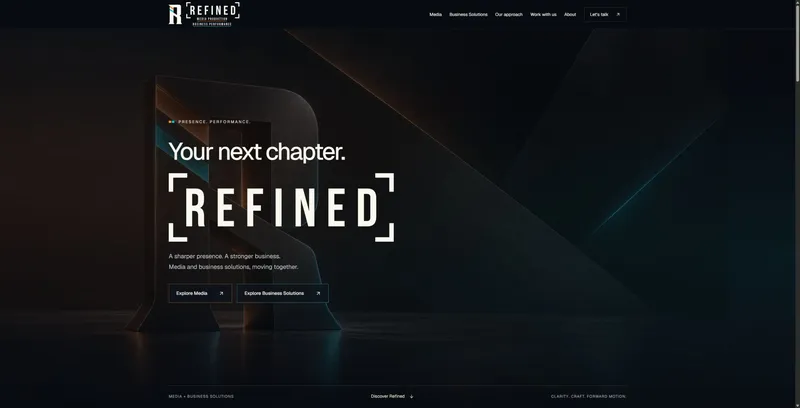
From the first impression to the next conversation.
Operant built Refined's website and connected CRM and business workflows. The website brings Media and Business Solutions together under one identity, with clear offers and routes to get in touch.
Our engagement with Refined now focuses on advertising and the information needed to follow up on inquiries. Refined produces the creative; Operant handles the agreed campaign setup, management and measurement. Campaigns run only on the approved schedule.
Craftsmanship, made visible.
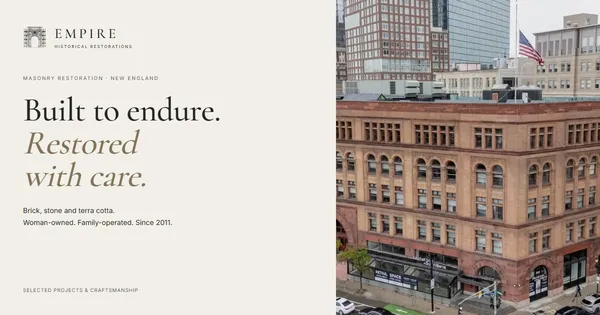
A portfolio-led website for a family-operated historic masonry restoration company in New England. Project photography and films, the people behind the work and the company's credentials give prospective customers a closer look before they request a bid.
- Project portfolio and films
- Company story and credentials
- Mobile-friendly bid inquiry
The website is live, with hosting and support provided under the agreed service plan.
A clear service offer. A useful inquiry.
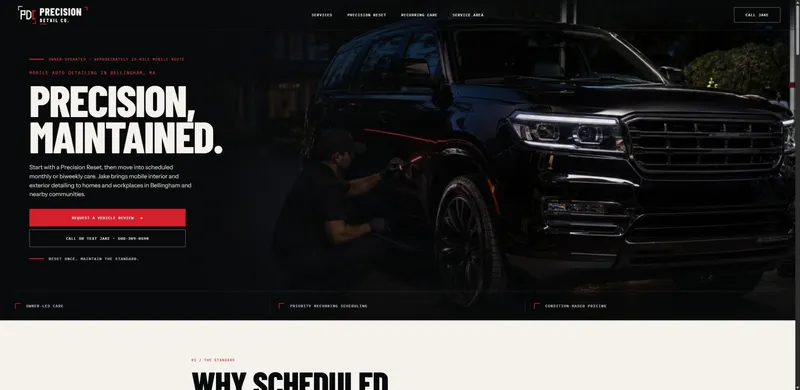
A website for an owner-operated mobile detailing business. Clear service information helps customers choose where to start, while the vehicle-review form captures the details the owner needs to discuss the job.
The inquiry path brings the vehicle, service request and contact details into the same conversation.
Inside Operant
Every inquiry needs a next step.
Our own inquiry process keeps the request, where it came from and the person responsible together. Nick owns the response.
Keep the useful details
Capture who is getting in touch, what they want to improve and where the inquiry came from.
Check before passing it on
Store the request and verify the submission before passing it to the customer system. These checks help keep spam out of the sales process.
Give it an owner
Nick reviews the context and responds personally, with the request available for the next conversation.
Try a billing workflow
The job is done.
Why is the invoice still waiting?
Hours, job records and charges often arrive in different places. Follow one completed job into an invoice draft, resolve a missing detail and review it before release.
Interactive billing demonstration Sample records
No invoice is sent. No payment is taken.
- 01Work complete
- 02Detail missing
- 03Draft ready
- 04Approved
- 05Ready to export
From the job to the invoice
Bring the completed work together.
The shift record and agreed charges arrive in one place.
Billing can review the work without rebuilding it from messages.
Customer
Northline Siteworks
Local haulage shift- Work evidence
- Shift record + agreed charges
- Customer purchase order
- Not supplied
One detail is missing. This customer requires a purchase order before the draft can be approved.
Use the sample reference, then add it to this draft.
Completed shift charges
| Description | Quantity | Rate | Amount |
|---|---|---|---|
| Haulage shift$125.00 / hour | 8 hours | $125.00 | $1,000.00 |
| Disposal charge$180.00 / load | 1 load | $180.00 | $180.00 |
Awaiting approval
Ready for the agreed billing system. Nothing has been sent or paid.
Check customer billing requirements
Inspect the supporting record
- Completed shift record8 hours of haulage recorded. Shift marked complete in this sample.
- Agreed disposal chargeOne disposal load at the agreed sample rate of $180.00.
Record history
- Shift 014 marked complete. Work details and charges attached.
From completed work to an approved draft
- Bring the completed work together. The shift record and agreed charges arrive in one place. Billing can review the work without rebuilding it from messages.
- Catch the missing detail. This customer needs a purchase order. The draft is held until it is added. Resolve the gap before an incomplete invoice reaches the customer.
- Review the complete draft. The purchase order, hours and charges now appear together. A person can check the invoice against the original work before approving it.
- Keep approval tied to this version. You have approved this exact draft. If a charge changes, it needs another review.
- Ready for the next handoff. The approved invoice is ready to export. Billing can hand off a checked document with its supporting record.
Sample workflow and charges, not Operant service prices. Real projects define the source records, tax and billing rules, approvals and software connections before implementation.
This interactive demonstration uses fictional records. We scope custom billing software around your process, tools and approval rules.

What would help your business move forward?
Tell Nick what you want to improve. We will work out the right starting point together.